Projects · 02
SubmitALL – Shop Drawing Workflow Packager
30–60 min → 3–8 min
Time to package a set of mechanical shop drawings
After months of revisions, I built a Windows-based Python tool that changes how we package mechanical shop drawings. What used to take 30 to 60 minutes now takes 3 to 8. It automates the work, simplifies it, and gives consistent output every time.
What it does
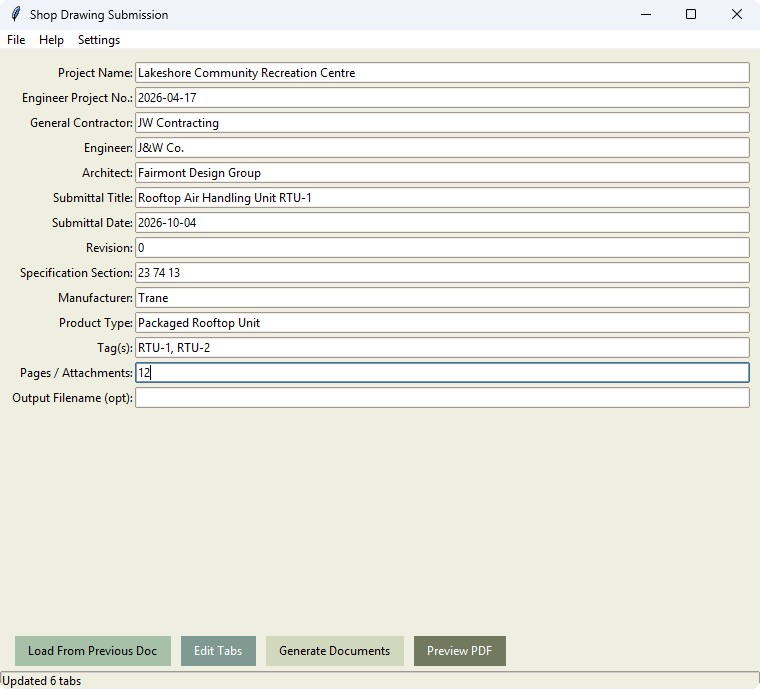
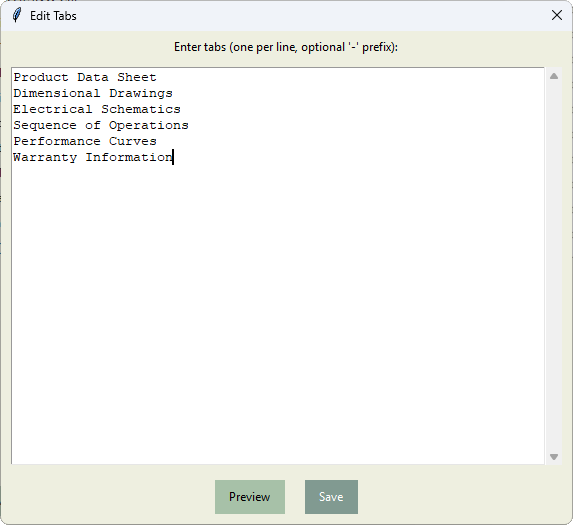
- Automates title pages and divider tabs from Word templates
- Imports shop PDFs and lets you drag tabs to their correct positions
- Exports a single, clean Package.pdf that's ready for consultant submission
- Loads data from previous DOCX files to save time
- Saves your settings for faster, smoother workflows
Why it matters
- Saves hours on each project by cutting manual work
- Fewer resubmittals thanks to placeholder-driven templates
- Keeps every package consistent in branding, structure and page order
- Consultant-friendly: uses Word for DOCX-to-PDF formatting
Features
- Live PDF previewer with drag-and-drop tab placement
- Undo history for quick reversals
- Debounced rebuilds keep previews fast and responsive
- PDF-first tabs for clear, reliable page ordering
- Dark mode toggle with saved preferences
- Settings panel for themes, recent folders and saved layouts
- Cleans up filenames, removes temporary files, and processes in the background
How it's built
About 1,200 lines of Python, packaged as a Windows desktop app.
- Interface: Tkinter, with a light and dark theme.
- Templates: python-docx fills
[[placeholder]]fields in the Word title-page and tab templates. - Word to PDF: drives Microsoft Word through COM automation, so the output matches what consultants expect from Word.
- Preview: PyMuPDF renders the shop PDFs page by page for the drag-and-drop tab placement.
- Packaging: PyPDF2 splits the shop drawings and merges everything into one Package.pdf.
- Responsiveness: heavy work runs on background threads, and preview rebuilds are debounced.
- Settings: saved to JSON, including theme, recent folders and layouts.
Help & settings
A dedicated Help/About panel explains the core workflows, and an integrated Settings menu handles customization.